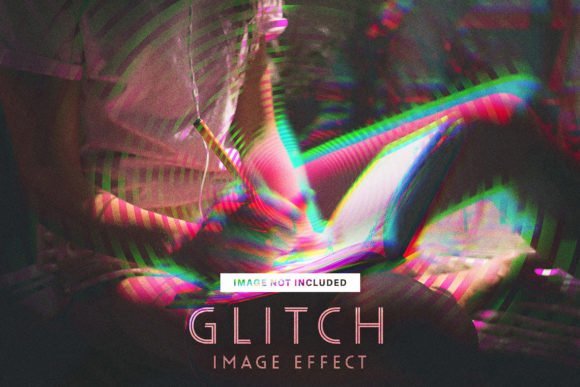
Glitch Image Effect Photoshop: A Practical Guide to Digital Distortion
In the evolving landscape of digital design, the aesthetic of imperfection has found a permanent home. The Glitch Image Effect Photoshop template represents more than just a trendy visual filter; it is a bridge between high-resolution photography and the raw, chaotic energy of digital interference. For designers, marketers, and content creators, mastering this effect is about understanding how to disrupt visual expectations intentionally. This guide explores the practical application, technical specifications, and creative potential of utilizing a dedicated glitch effect file within Adobe Photoshop.
Understanding the Glitch Aesthetic in Modern Design
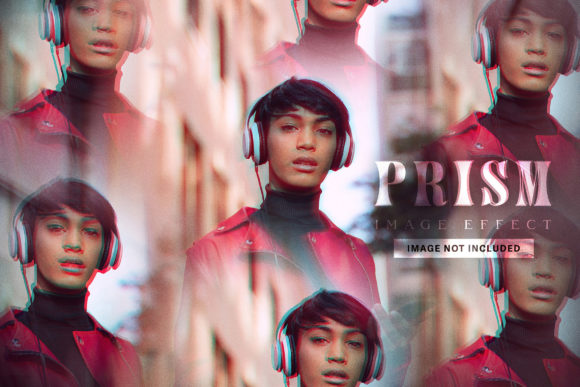
Before diving into the technical aspects of the PSD file, it is essential to understand why this effect resonates with contemporary audiences. Glitch art mimics the artifacts of digital errors—pixel sorting, chromatic aberration, and data corruption—but applies them with artistic precision. When you utilize a Glitch Image Effect Photoshop resource, you are not merely applying a blur or a noise filter. You are engaging with a visual language that suggests technology, futurism, and edgy authenticity.
This aesthetic serves specific psychological functions in design. It breaks the monotony of polished, perfect imagery, drawing the viewer's eye through contrast. For brands targeting Gen Z or tech-savvy demographics, this effect signals relevance. However, its utility extends beyond niche audiences. In editorial design, music promotion, and cyberpunk-themed branding, the controlled chaos of a glitch effect provides a necessary counterpoint to clean typography and structured layouts.
Technical Specifications and File Integrity
The effectiveness of any digital asset lies in its technical foundation. A professional Glitch Image Effect Photoshop file must balance creative flexibility with production-ready standards. The specific file discussed here is engineered for high-fidelity output, ensuring that the distortion looks intentional rather than like accidental compression artifacts.
- Dimensions: 3600 x 2400 pixels. This resolution supports large-format printing and high-DPI web displays without loss of clarity.
- Resolution: 300 DPI. Essential for commercial print work, posters, and magazine spreads.
- Color Mode: RGB. Optimized for screen-based media, ensuring vibrant neon shifts and accurate color channel splitting.
- Compatibility: Adobe Photoshop CC or higher. This ensures support for modern smart objects and adjustment layers.
These specifications are critical because glitch effects rely heavily on pixel manipulation. Working at a lower resolution often results in muddy edges where sharp digital tears should exist. By maintaining 300 DPI at a substantial pixel dimension, the file preserves the crispness required for professional deliverables.
Navigating the Layer Structure for Efficient Workflow
One of the primary advantages of using a pre-built PSD over creating glitch effects from scratch is workflow efficiency. Creating authentic digital distortion manually involves complex channel manipulation, displacement maps, and slice tools. A well-organized Glitch Image Effect Photoshop file abstracts this complexity into a user-friendly layer structure.
Smart Objects and Non-Destructive Editing
The core of this template relies on clearly organized and labeled layers. Users should look for Smart Object placeholders. These allow you to double-click a layer, replace the placeholder artwork with your own image, save, and see the glitch effect update automatically across the entire composition. This non-destructive approach is vital for client work where revisions are frequent. You can swap subjects instantly without rebuilding the distortion masks.
Customization Depth
While the effect is easy to apply, true value comes from customization. The included PSD allows users to adjust the intensity of the glitch. Whether you need a subtle VHS tracking error or a catastrophic data mosh, the layered structure permits granular control. Labeled layers ensure that even users with intermediate Photoshop skills can identify which controls affect color separation versus geometric displacement.
Practical Applications and Use Cases
Versatility is a hallmark of the Glitch Image Effect Photoshop template. Understanding where to deploy this effect maximizes its impact while preventing visual fatigue. Below are practical scenarios where this asset delivers tangible value.
- Music Industry Promotion: Album covers, Spotify canvases, and concert posters frequently utilize glitch aesthetics to convey genre-specific moods, particularly in electronic, hip-hop, and alternative rock.
- Social Media Campaigns: Static posts often get lost in feeds. A glitching portrait creates motion-like interest in a still image, increasing dwell time and engagement rates.
- Tech and Gaming Branding: Companies in these sectors use digital distortion to align their visual identity with their product ecosystem. It reinforces themes of coding, hardware, and virtual environments.
- Editorial and Fashion: High-fashion editorials often juxtapose classic portraiture with digital decay to comment on the intersection of humanity and technology.
Evaluating Suitability for Your Project
Not every project benefits from digital distortion. When considering the Glitch Image Effect Photoshop file, evaluate the emotional tone of your message. Glitch effects inherently communicate disruption, tension, or modernity. If your goal is to convey stability, tradition, or organic warmth, this effect may create cognitive dissonance.
Furthermore, consider legibility. Heavy glitching can obscure facial features or text. The 3600 x 2400px canvas size helps mitigate this by providing ample negative space. Always ensure that the subject remains recognizable unless total abstraction is the intended goal. Test the effect at actual viewing sizes; what looks dramatic on a 27-inch monitor might be illegible on a mobile screen.
Best Practices for Implementation
To achieve professional results with this Glitch Image Effect Photoshop template, adhere to several best practices derived from experienced usage.
Image Selection Matters
High-contrast images yield better glitch results. Flat, low-contrast photos often fail to trigger the displacement maps effectively, resulting in a washed-out appearance. Portraits with strong lighting, architectural shots with defined lines, and graphics with bold colors interact most successfully with the underlying effect layers.
Color Grading Integration
Since the file operates in RGB mode, the glitch effect will introduce chromatic aberration (red/cyan shifts). Ensure your overall color grading complements these shifts. Attempting to force a warm, sepia tone over an effect designed for cool, digital color splits can result in muddy browns. Embrace the RGB nature of the file for the cleanest output.
Export Considerations
When exporting for web, be mindful of file size. Glitch effects contain high-frequency detail that JPEG compression struggles with, often introducing unwanted secondary artifacts. Use PNG-24 for web graphics to preserve the sharp edges of the digital tears. For print, stick to TIFF or maximum-quality PDF formats to maintain the 300 DPI integrity.
Limitations and Managing Expectations
Transparency regarding limitations ensures user satisfaction. First, placeholder images are not included in the final files. Users must supply their own licensed photography or artwork. Second, while the file is compatible with Photoshop CC, older versions (CS6 and below) may not support specific smart filters or blending modes used to create the effect. Always verify your software version before purchase.
Additionally, while the effect is customizable, it is bound by the logic of the original creator’s displacement maps. Users seeking completely procedural, randomized generation may find a static PSD limiting compared to generative scripts. However, for consistent, repeatable branding assets, the static PSD offers superior reliability and speed.
Conclusion: Elevating Visual Narratives
The Glitch Image Effect Photoshop template is a specialized tool for the modern visual communicator. It transforms standard photography into compelling digital art through a combination of high-resolution engineering and intuitive layer management. By understanding its technical parameters, appropriate use cases, and customization potential, creators can leverage this effect to add depth, edge, and contemporary relevance to their work. Whether for commercial branding or personal artistic expression, this file provides a robust foundation for exploring the beautiful imperfections of the digital age.